

Complete Guide to Publishing Your Book in India Using InkSight Publication (Step-by-Step)
If you are planning to publish your book in India but feel confused about the process, you are not alone. Many beginners, students, and even experienced writers struggle with where to start and how to proceed.
The good news is that with modern self publishing platforms like Inksight Publication official website, the entire process has become simple, structured, and beginner-friendly.
This guide will walk you through each step of publishing your book using the InkSight dashboard. You will understand exactly what to fill, how to upload your manuscript, how to set pricing, and how you can start earning from your book.

Whether you want to publish a novel, academic book, or even your handwritten notes, this guide will help you turn your idea into a published book.
Quick Summary
You can publish your book in India in 8 simple steps using InkSight. From entering book details to uploading your manuscript, selecting cover design, setting audience, and finalizing royalty, everything is managed through a user-friendly dashboard.
This process is ideal for beginners, students, teachers, and professionals who want to publish and earn from their knowledge.
Step-by-Step Guide: How to Publish Book in India
Follow the complete process from the publish your book section.
Step 1: Book Information
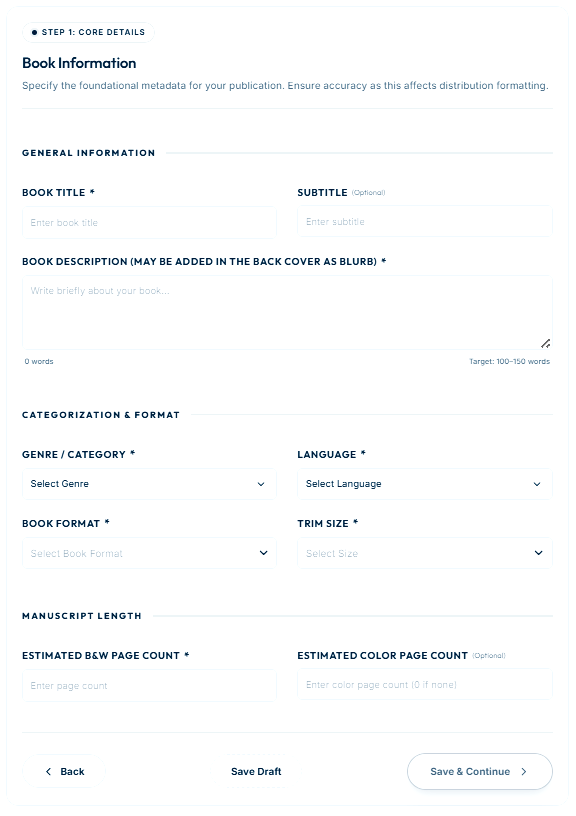
This step defines the identity of your book. All details entered here will be used in publishing, listing, and reader discovery.
| Field | What You Need to Enter |
|---|---|
| Book Title | Enter the main name of your book, for example "Motivation" |
| Subtitle | Write a supporting title that explains your book, like "Transform Your Life" |
| Book Description | Write a short summary of your book (100–150 words) to attract readers |
| Genre | Select the category like Fiction, Academic, Poetry, etc. |
| Language | Choose the language of your book such as English or Hindi |
| Book Format | Select format like eBook or Paperback |
| Trim Size | Choose book size like 5×8, A5, or 6×9 based on content type |
| Page Count | Enter estimated number of pages (minimum 40 pages required) |
Step 2: Author Details
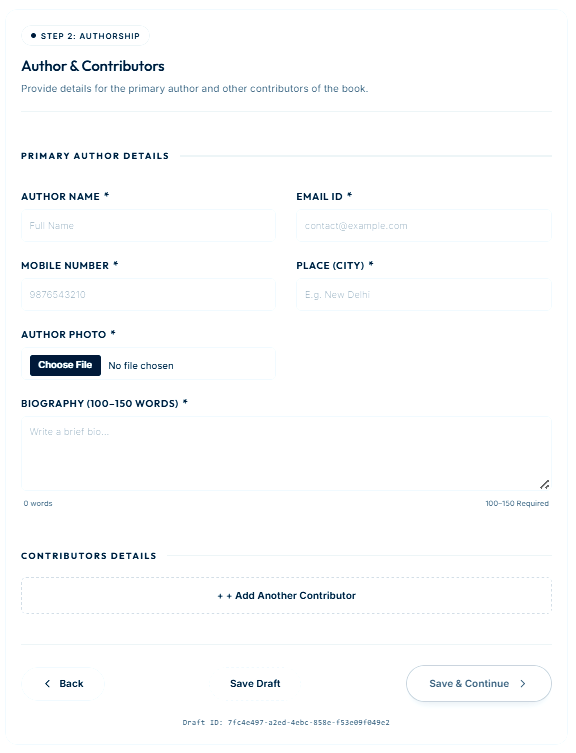
This section builds your author profile which readers will see along with your book.
| Field | What You Need to Enter |
|---|---|
| Author Name | Enter your full name as you want it printed on the book |
| Email ID | Provide a valid email for communication and updates |
| Mobile Number | Enter your contact number for verification |
| City | Mention your city like Delhi, Mumbai, etc. |
| Author Photo | Upload a clear and professional photo |
| Biography | Write a short introduction about yourself (100–150 words) |
Step 3: Manuscript Upload
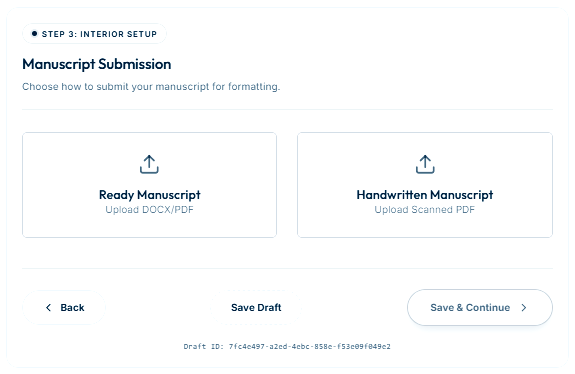
Here you will upload the main content of your book.
| Option | Explanation |
|---|---|
| Ready Manuscript | Upload your typed file in DOCX or PDF format |
| Handwritten Manuscript | Upload scanned PDF of neatly written pages |
Make sure your manuscript follows proper structure including title page, chapters, and conclusion.
Step 4: Cover Design
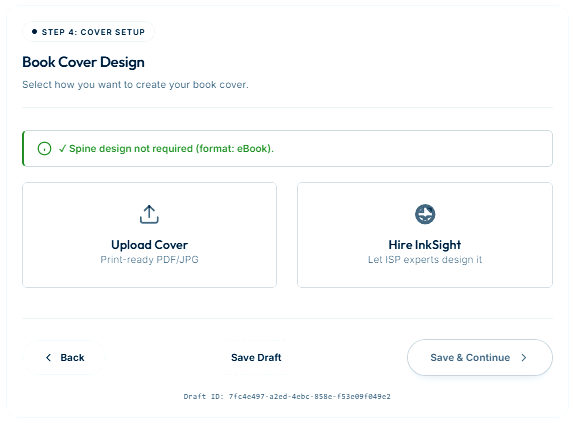
The book cover is the first thing readers see, so choose wisely.
| Option | Explanation |
|---|---|
| Upload Cover | Upload your own print-ready design in PDF/JPG |
| Hire InkSight | Let professionals design a high-quality cover for you |
Step 5: Marketplace & Audience
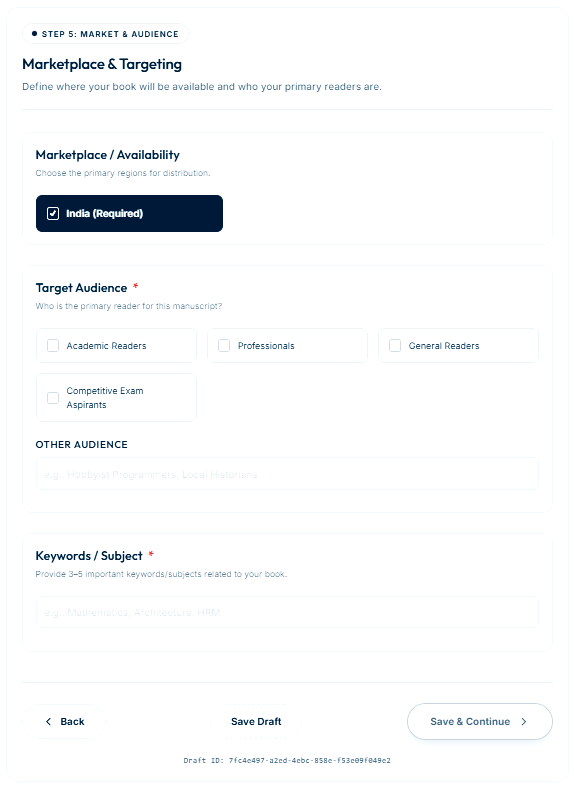
This step ensures your book reaches the right readers.
| Field | Explanation |
|---|---|
| Marketplace | Select region like India where your book will be available |
| Target Audience | Choose readers like students, professionals, or general readers |
| Keywords | Add keywords like motivation, success, study notes to improve search visibility |
Step 6: Promotional Add-ons
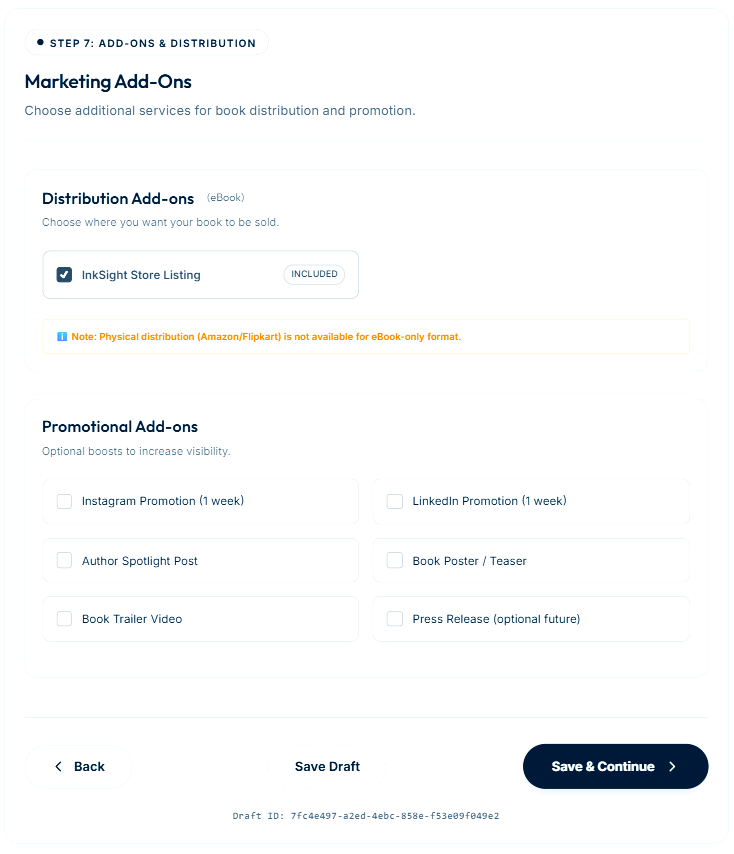
Promotion helps your book reach more people and increase sales.
| Service | Explanation |
|---|---|
| Instagram Promotion | Your book will be promoted on Instagram through posts, reels or stories to reach a wider audience. This helps increase visibility among readers, especially young audiences and students who actively use social media. |
| LinkedIn Promotion | Your book will be promoted on LinkedIn to target professionals, educators and industry experts. This is especially useful for academic, technical, or career-related books where the audience is more professional. |
| Book Trailer | A short promotional video is created to showcase your book concept, story or value. Book trailers help attract attention and can be used on social media platforms to increase engagement and sales. |
| Poster / Teaser | Professionally designed posters and teaser creatives are created for your book. These can be used for marketing campaigns, social media promotion and sharing with your audience to generate interest before and after launch. |
Step 7: Copyright & ISBN
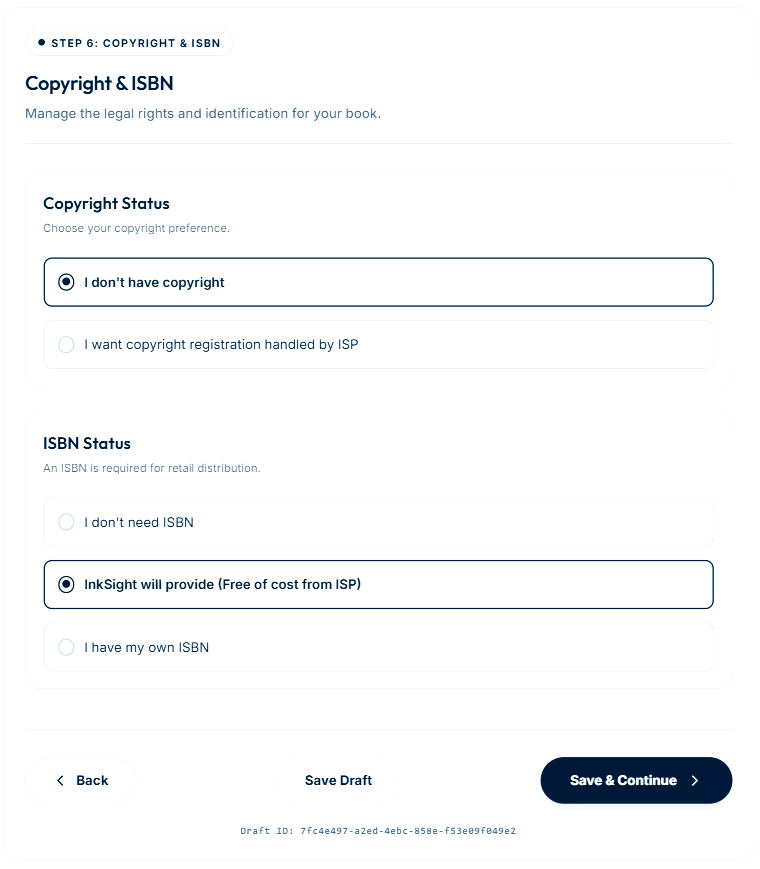
This step handles legal ownership and identification of your book.
| Field | Explanation |
|---|---|
| Copyright | Choose whether you want to register copyright |
| ISBN | Select InkSight free ISBN or use your own |
Step 8: Review & Royalty
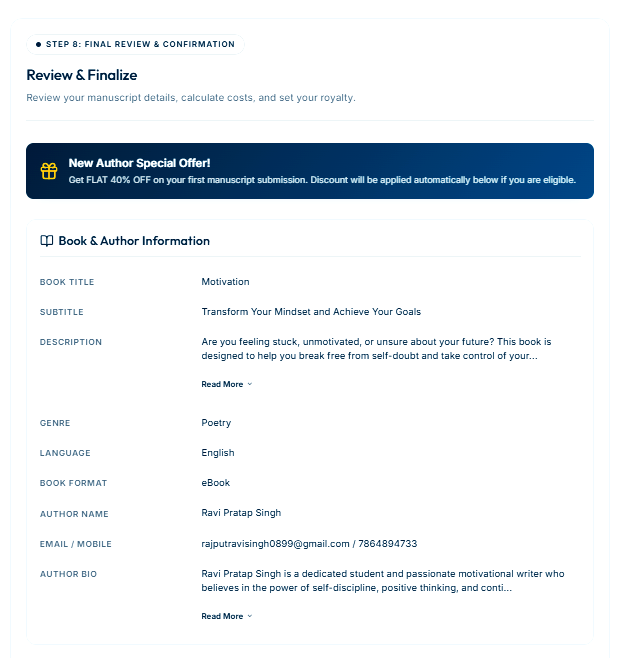
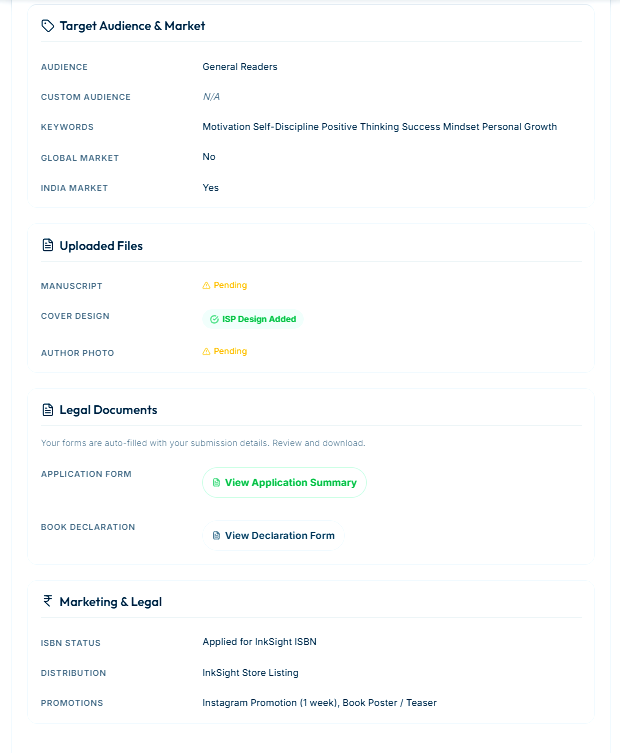
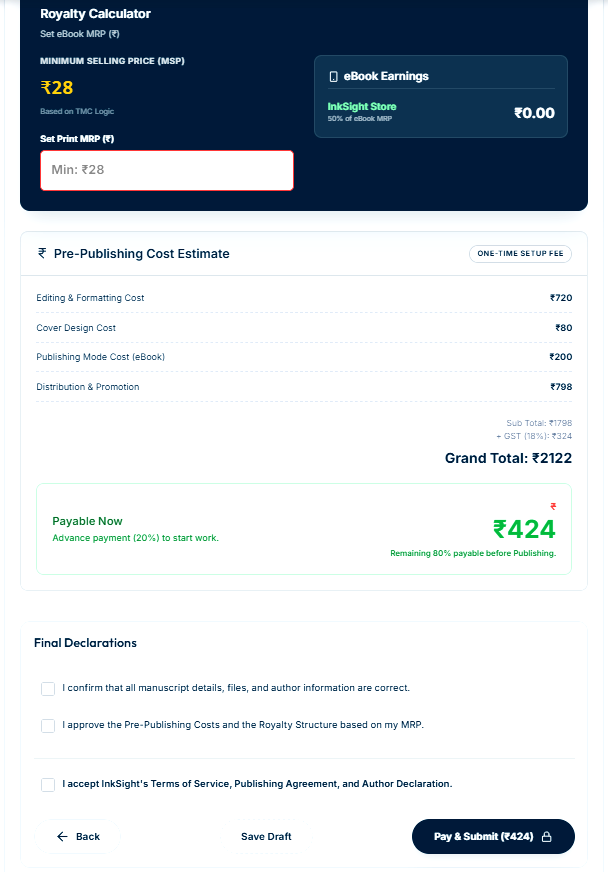
This is the final step before publishing your book. In this stage, you verify all details, understand your cost and earnings, confirm declarations, and complete the final process.
| Action | Explanation |
|---|---|
| Review Details | Carefully check all book information, author details, manuscript, cover design and selected options before final submission |
| Set MRP | Enter your book selling price (MRP). Choose a price that balances reader affordability and your profit |
| Royalty Check | See your estimated earning per book sale based on selected MRP, printing cost and platform charges |
| Pre-Publishing Cost Estimate | View the total estimated publishing cost based on page count, trim size, paper type, GSM, binding, and selected services. This gives you a clear idea of your investment before proceeding |
| Final Declarations | You must check all confirmation boxes stating that your manuscript is original, information is accurate, and you agree to InkSight’s publishing terms and conditions |
| OTP Verification | An OTP will be sent to your registered email address. Enter the OTP to verify your identity and securely proceed to the next step |
| Payment | Pay 20% advance of the total publishing cost to start the process. The remaining 80% amount must be paid before final publishing and book release |
Once all steps are completed successfully, your book enters the production phase including editing, design, and final publishing.
Conclusion
Publishing a book in India is no longer difficult. With InkSight, you can easily convert your ideas, notes, or stories into a professional book.
If you want to become an author and earn from your knowledge, this is the best time to start.
FAQs
Can beginners publish a book?
Yes, beginners can easily publish a book using InkSight Publication. The platform is designed in a step-by-step format where you simply need to fill in your book details, upload your manuscript, and follow the guided process. Even if you have no prior publishing experience, you can still become an author without facing the complexities of traditional publishing.
Can I publish handwritten notes?
Yes, you can publish handwritten notes on InkSight. You just need to scan your handwritten content clearly and upload it as a PDF file. This is especially useful for students, teachers, and educators who want to convert their study notes, class materials, or educational content into a published book and reach a wider audience.
How do I earn money?
You earn money through royalties on every book sale. After setting your book price (MRP), the platform calculates your earnings per copy based on printing and publishing costs. The more copies you sell, the more income you generate. This creates a passive income opportunity where your knowledge continues to earn for you over time.
Is ISBN required?
Yes, an ISBN (International Standard Book Number) is required if you want to sell your book commercially and make it available in the market. InkSight Publication provides ISBN support, so even if you don’t have one, you can apply through the platform easily. ISBN helps in identifying your book globally and improves its credibility.
How long does it take?
The publishing time depends on your manuscript quality, completeness, and selected services. Typically, the process can take a few days to a couple of weeks, including editing, design, and final approval. If your content is well-prepared and all details are correct, the process becomes much faster.
About InkSight Publication
InkSight Publication is a modern self publishing platform in India that helps authors, students, educators, and researchers publish books, academic modules, research papers, and study material easily. As a growing book publisher in Rajasthan, InkSight supports writers in converting their ideas, notes, and knowledge into professionally published books with ISBN and global visibility.
Start Your Publishing Journey
If you want to publish your book, academic notes, engineering books, or study material online, InkSight Publication provides a simple and author-friendly publishing process. Start your journey today and turn your knowledge into a published book while reaching readers across India.
Leave a Reply